TRADE BOOSTER Forex EA
NOTE: I am selling this product only through WhatsApp. If you are purchasing this from any other source like through Telegram group or Instagram or any other Website then thats not me, thats a Scammer. Please be aware.
TRADE BOOSTER Premium Expert-Advisor (Robot) is designed to trade FOREX in MT4 Platform.
It Automate your FOREX Trading (no manual effort) which gives high profitable result.
It is very Advanced and highly profitable compare to previous version 2.0.
* Strength.
* TREND Confirmation.
* MOMENTUM Confirmation.
In verson 3.0 the confirmation is based on Trend and Momentum and Advance Currency Meter Strength from 5Mins Time Frame to 4Hrs Time Frame
How this TRADE BOOSTER Forex EA v3.0 works.?
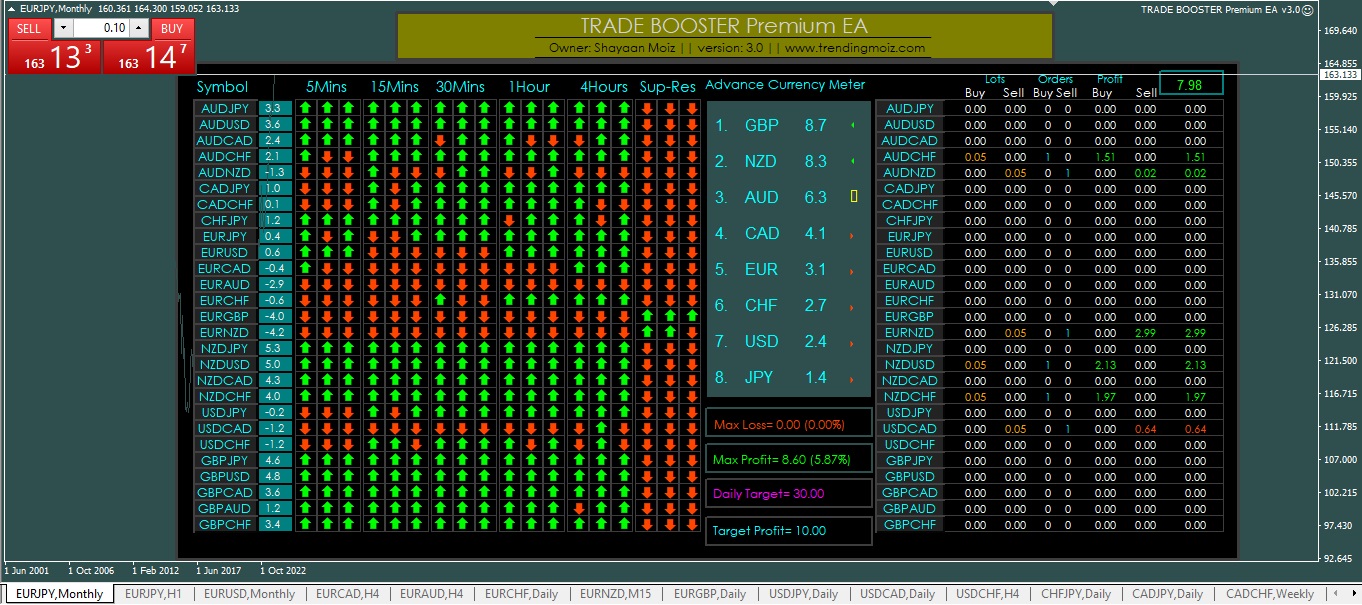
1) First This EA will take confirmation from STRENGTH, Then it will look for HL (High & Low). After getting confirmation from HL it will check TREND Confirmation of 5Mins, 15Mins, 30Mins, 1Hrs & 4Hrs time frame. If all time frames are on the same direction then only it will look for MOMENTUM or else EA will keep checking TREND. After that EA will check Support & Resistance Area. If that pair forms at SnR region then it wont execute. So overall this EA will keep checking every individual confirmation from Strength,Trend, Momentum & SnR. If any single confirmation will be missing then EA will not place any single trade.
2) After getting all previous confirmation from Strength, HL, Trend, Momentum, then Advance Currency Meter it will place trade for Buy or Sell.
3) As you can see Max Profit, Max Loss,Daily Target & Target Profit I have mentioned in the EA. MAX Profit and Loss will show you how much maximum profit and loss made by this EA on the current running trade. Daily & Target Profit is same that, I have mentioned in the parameter above.
4) I have added News Filter in this version 3.0, If you want EA should close all running trade and wont execute any new trade at News Time then Kindly set is True "Filter the Trade before and after news" & "Close Trade Before and after news".
5) Simply drag n drop the EA from Expert Advisor list in one of your chart and Enable the Auto Trading mode of your MT4. Rest EA will handle everything. Automatically it will take trade when ever it will get signal from all 5 Confirmations.
TRADE BOOSTER Forex-EA Settings:
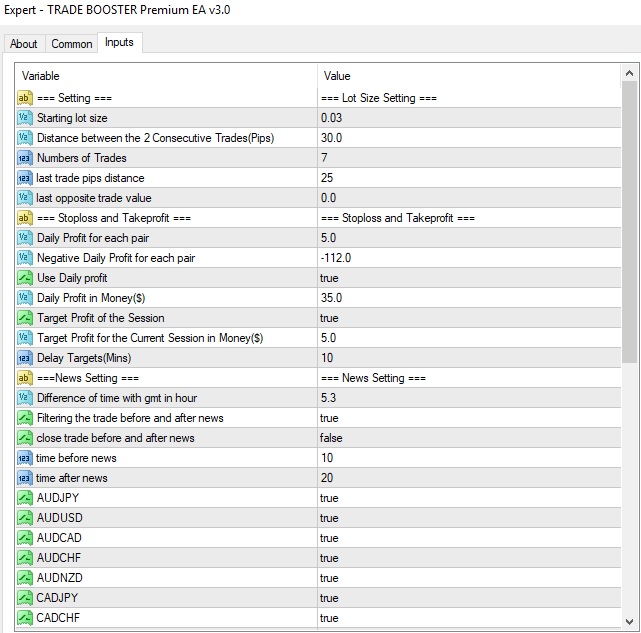
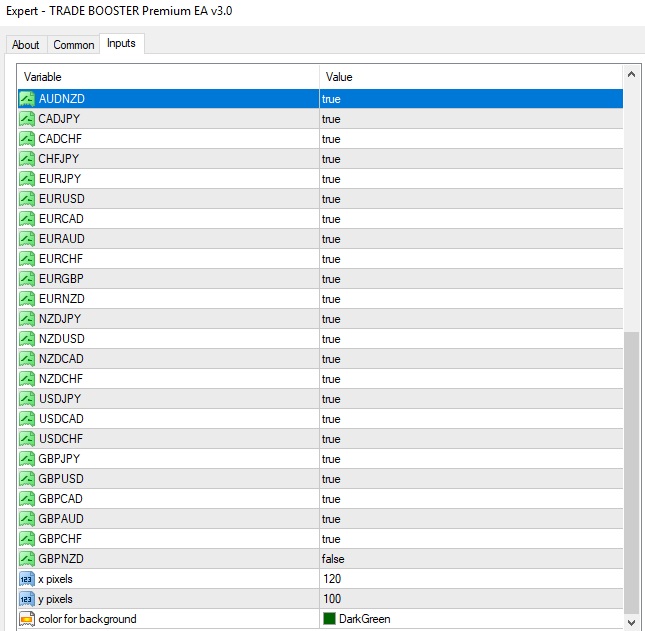
Parameters :
1) Starting Lot Size : You have to set lot size based on your equity.
2) Distance between the 2 Consecutive Trades(Pips) : This is the distance between 2 consecutive trades. If 1st trade got executed at 1.1500 for buy then 2nd trade will be 1.1515 at specified pips.
3) Number of Trades : How much max number of trades you want to get executed on a particular pair. I set 11.
4) Last Trade Pips Distance :Make it 0, On Zero Value EA will be NON Grid EA. But If you want your EA to be as Grid EA then set 20 to 25 pips. It will open the last trade as a Opposite one Suppose your 1st trade is Buy then EA will take last trade as a Sell trade and vice versa for Sell if Last Trade Pips distance is Non Zero value. [last trade will be (11th trade) based on No of Trades function at 3rd step)].
5) Last Opposite Trade Value :I am keeping 0 here. But if you want your EA to be Grid then set some value. This one will be the Lot Size of your last Trade.
6) Daily Profit for Each Pair($) :This one is Daily Profit in Dollar for each Pair.
7) Negative Daily Profit for Each Pair($) :This is the Negatve Daily Profit in Dollar for each Pair. If Market goes in reverse of your taken trade then at given value it will close the trade of that particular pair.
8) Use Daily Profit :Set TRUE.
9) Daily Profit in Money($) :Daily Profit is in Dollar. So after reaching this Profit, EA will stop taking trade for that day. Next trade will start on next day.
10) Target Profit of the Session :Set TRUE.
11) Target Profit for the Current Session in Money($): Target profit is actually how much you are targetting the profit in the current running trade. For example if you set 7 which is in Dollar. And Currently total 10 Trades are running and out of 10 trades 6 trades are in profit and remaining 4 trades are in loss, And over all current Net profit is 7$, Then all negative and positive trades will close automatically.
12) Delay Target(Minutes) : This is the gap between 2 consecutive Target Profit in Money($).Suppose you set 30 value which is in Minutes. So as soon as Target Profit hits the given value then EA will wait till 30 minutes. Then EA will be active and start taking next further trade.
13) Difference of time with gmt in hour :You have to set your country GMT timing so that EA will work based on your Local time.
14) Filtering the trade before and after news :It filter out the trade based on 2 Star & 3 Star News in between the before and after timing.
15) Close trade before and after news :It closes the trade in between the specified timing of upcoming 2 Star and 3 Star News not the minor one(1 Star News).
16) time before news :You have to specify time, From what time before the news you want to filter or close your trade.
17) time after news :You have to specify time, till what time after the news you want to filter or close your trade.
18) Currency Pairs :You can customise the currency pairs as your requirement. Which pair you want you can keep it by setting it True and for discarded pairs set value False.
19) X & Y-Axis: These are the axis for adjustment of your EA.
20) Background_Color : You can customise the background color of your EA.
Based on your Equity the settings will be:
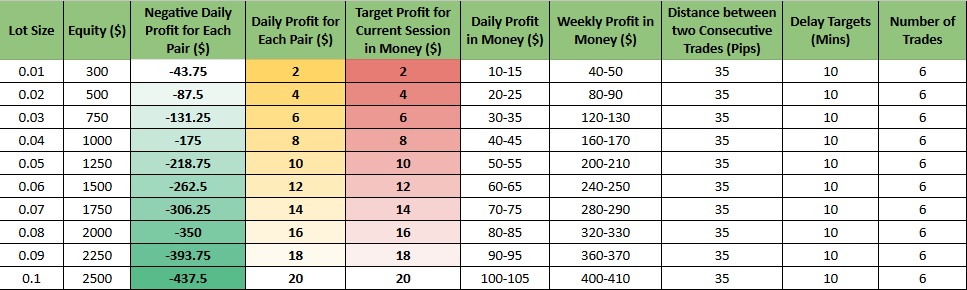
Rest all settings of the EA will remain same from the shared Settings Detail image.
After configuring the EA on your MT4 terminal you have to do some settings, follow the instructions:
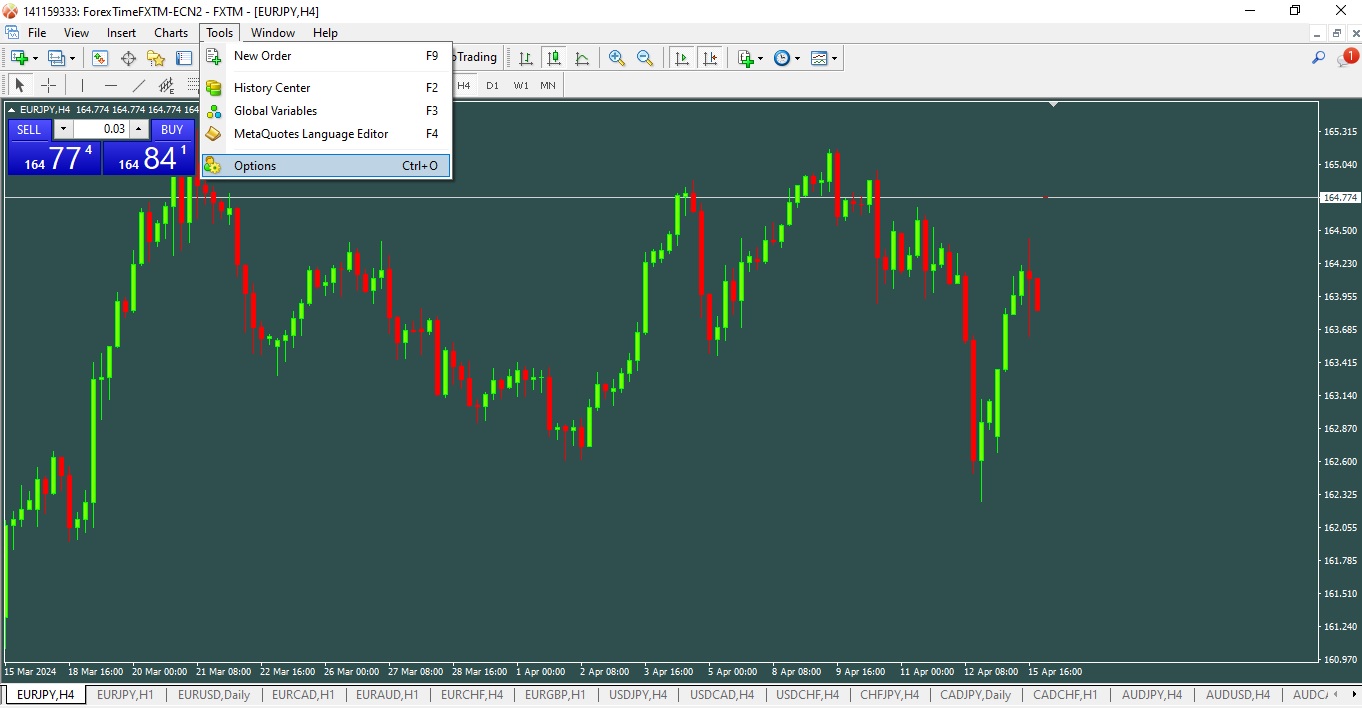
1) From the 1st screenshot you have to click on Tools of your MT4 terminal and then click on Options
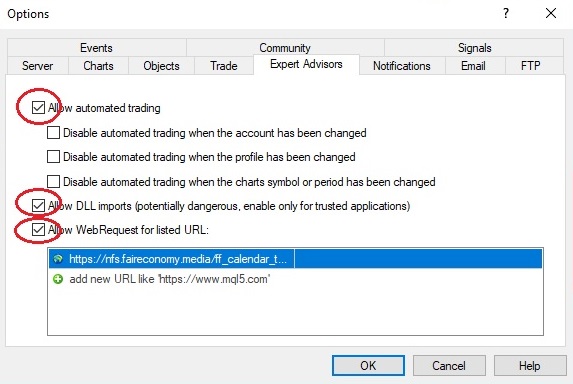
2) Then you have to click on Expert Advisor tab and Make Sure Allow automated trading , Allow DLL imports, Allow WebRequest for listed URL: should be checked. And remaining all 3 Disable should be unchecked.
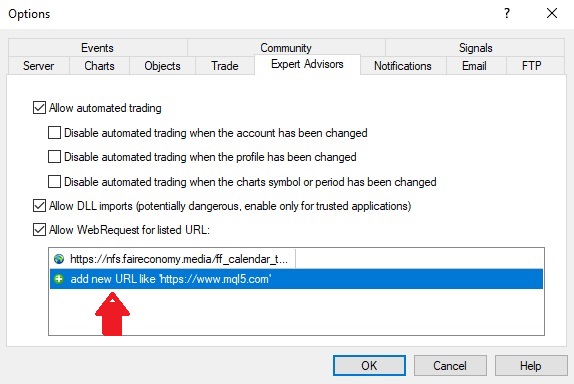
3) Then after click on add new URL and paste this shared link. This link is specially for News Syncronisation. It will update the all major and Minor news according to your local Time.
https://nfs.faireconomy.media/ff_calendar_thisweek.csv
✓ One next Update free ✓ 10AM to 6PM Support